
1.先创建bond 配置文件
vi /etc/sysconfig/network-scripts/ifcfg-bond0
具体内容如下(IP自行修改)
DEVICE=bonde
NAME=bonde
TYPE=Bond
BONDING_MASTER=yes
BOOTPROTO=static
ONBOOT=yes
IPADDR=10.0.0.10
PREFIX=24
GATEWAY=10.0.0.1
DNS1=223.5.5.5
DNS2=114.114.114.114
# LACP关键参数
BONDING_OPTS="mode=4 miimon=100 lacp_rate=fast xmit_hash_policy=layer3+4"
2.修改网卡文件
ifcfg-ens2f0
DEVICE=ens2f0
NAME=ens2f0
TYPE=Ethernet
BOOTPROTO=none
ONBOOT=yes
MASTER=bond0
SLAVE=yes
ifcfg-ens2f1
DEVICE=ens2f1
NAME=ens2f1
TYPE=Ethernet
BOOTPROTO=none
ONBOOT=yes
MASTER=bond0
SLAVE=yes
3.加载bond模块
modprobe bonding
echo "bonding" > /etc/modules-load.d/bonding.conf
4.重启网络
#关闭NM,避免冲突
systemctl stop NetworkManager
systemctl disable NetworkManager
systemctl restart network
5.查看bond状态
#看bond详细信息,确认Mode、Slave、LAcP状态
cat /proc/net/bonding/bonde
#看网卡速率
ethtool ens2f0
ethtool ens2f1
6.交换机配置
将两个网口都放到同一个Trunk下,Trunk链路聚合设置为静态LACP模式(mode lacp-static),Trunk具体设置如下
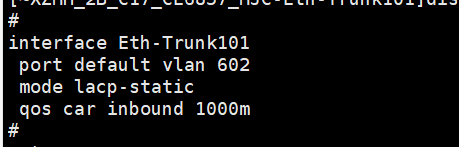
网口设置如下
