
默认MTU为1500,需要把MTU值修改为1420,以下都已修改为1420为例
windows系统
1.管理员运行CMD
2.查看当前网卡名称和 MTU
netsh interface ipv4 show subinterfaces
3.把目标网卡的 MTU 设为 1420
netsh interface ipv4 set subinterface "以太网" mtu=1420 store=persistent
4.验证是否生效,看到该网卡的 MTU 变成 1420 即成功
netsh interface ipv4 show subinterfaces
老版windows系统
老版系统会有中文字符不匹配的问题,这时候需要用网卡Idx定位网卡
1、查看网卡索引 Idx
netsh interface ipv4 show interfaces
#输出样例:
Idx     Met         MTU          State                Name
---  ----------  ----------  ------------  ---------------------------
  1          50  4294967295  connected     Loopback Pseudo-Interface 1
 10          20        1500  connected     本地连接
2.用索引号设置 MTU=1420
netsh interface ipv4 set subinterface 10 mtu=1420 store=persistent
CentOS7 / Rocky / AlmaLinux系统
1.直接在网卡配置文件添加一行MTU=1420
echo MTU=1420 >> /etc/sysconfig/network-scripts/ifcfg-eth0
2.重启网卡
systemctl restart network
CentOS8+/RHEL8+
# 查看连接名
nmcli connection show
#设置MTU,引号内是连接名称
nmcli connection modify "Wired connection 1" ethernet.mtu 1420
# 重载生效
nmcli connection up "Wired connection 1"
Ubuntu
1.打开网卡配置文件
sudo nano /etc/netplan/00-installer-config.yaml
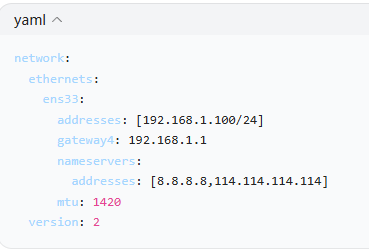
2.配置yaml文件,在网卡下加一行mut: 1420 (严格空格,不能 tab)
3.启用配置
sudo netplan try
sudo netplan apply
4.校验
ip a
Debian
1.打开网卡配置文件
vi /etc/network/interfaces
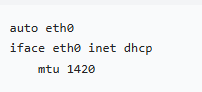
2.网卡配置里加一行mtu 1420
3.重启网卡
systemctl restart networking